Stop Pasting Secrets Into AI Agents
Token Vault gives your AI agents scoped, revocable, audited access to your API keys — and never holds them. Your credentials live on a webhook you deploy in ten minutes.
Agent identities, scoped grants, ABAC policies and full audit — plus an OAuth 2.1 authorization server for MCP.
claude mcp add --transport http token-vault https://api.tokenvault.uk/api/agents/mcp
Or paste the URL into any MCP client — OAuth 2.1 handles the rest.
Free to use. Read our Privacy Policy and Terms of Service.
What is Token Vault?
A credential access layer built for the AI-agent era. Your keys and tokens live on your own webhook — Token Vault never touches them. It routes scoped access to your agents through secure proxies and grants, with policy and audit on every request.
Read the architecture overviewYour Tokens, Your Rules
Every credential you store is protected by choices you make: where it lives, whether it's encrypted, and who can refresh it. Token Vault never touches the credential itself — there's nothing here for anyone to steal.
Webhook-Sovereign Storage
Your tokens live on your own server. Token Vault holds only metadata — never the credential.
No Credential Custody
Default
Your webhook is the only custodian and serves credentials directly. Token Vault issues a short-lived signed ticket and redirects the agent's request straight to your server — it never sees the credential.
- Credential never touches Token Vault
- Direct webhook-to-agent delivery
- Your webhook is the kill switch
Token Vault OAuth
Built-in OAuth
Built-in OAuth (Google, GitHub) redirects through Token Vault to complete the handshake. Tokens pass through in transit only and land on your webhook — Token Vault never persists them.
- Agents never see a 401
- Nothing stored at rest in TV
- Webhook stays the kill switch
Token Refresh
OAuth tokens expire. Token Vault makes sure your agents never notice.

Just-in-Time Refresh
When an agent or MCP proxy requests a token that has expired, your webhook refreshes it with the OAuth provider before the credential is returned. Your agents never see a 401. They always get a working credential.
Token Vault OAuth
For tokens created via Token Vault's built-in OAuth (Google, GitHub), when your webhook opts in, Token Vault briefly receives the refresh token in transit, exchanges it with the provider, and sends new tokens back to your webhook for storage. Credentials are in transit only — never stored by Token Vault.
Webhook-Delegated Refresh
For custom tokens where your webhook owns the OAuth credentials, Token Vault sends a refresh notification and your webhook handles the exchange entirely. Token Vault never sees any credential material. The request includes an urgent: true flag when an agent is actively waiting, so you can prioritize.
The Kill Switch
In webhook mode, you have absolute control over your credentials.
Your webhook is the only place credentials exist. Taking it offline instantly cuts all access to your tokens:
This is by design. No one — not Token Vault, not an attacker who compromises our servers — can reach your tokens without your webhook's cooperation. Bring it back online and everything resumes instantly.
Give AI Agents Exactly What They Need
Create agent identities, grant them scoped access to specific tokens with time limits, and revoke access instantly. Your agents call a simple HTTP endpoint. No SDK required.
See how scoped agent grants work
Creating Agents
Register an identity for each AI agent, script, or service that needs credentials.
Create in Dashboard
Name your agent (e.g., “Claude Code”, “CI Pipeline”) and add an optional description.
Copy the API Key
You get a unique key like tvagent_abc123.... It's shown once, so save it securely.
Use Anywhere
Pass the key in the Authorization: Bearer header or the x-agent-key header. Never in a URL.
Time-Scoped Token Grants
Grant access to specific tokens with automatic expiry. Choose a time limit and auto-refresh policy.
Pick a token
Choose which vault credential the agent can access (e.g., github,openai). Each grant is for one token.
Set a time limit
1 hour, 8 hours, 7 days, 30 days, or “Until revoked”. Grants expire automatically. The agent gets a clear error on its next request.
Auto-refresh (optional)
For OAuth tokens, enable auto-refresh so the agent always gets a valid access token, even if the original has expired.
Real-time vault fetch
Credentials are never stored in the grant. Each agent request triggers a fresh credential fetch — your webhook delivers the credential directly to the agent, so the kill switch works instantly.
Revoking Access
Remove an agent's access instantly from the dashboard.
Open the agent's detail page and click Revoke on any grant, or deactivate the entire agent. The change is immediate. The very next API call from that agent returns a 403 Forbidden. No propagation delay, no cache window.
You can also delete the agent entirely, which removes all grants and invalidates the API key permanently.
Code Examples
Integrate Token Vault credentials into your agents in a few lines of code.
import requests
from google.adk import Agent

TOKENVAULT_URL = "https://api.tokenvault.uk/api/agents/credentials"
AGENT_KEY = "tvagent_abc123..."  # store in env var in production

def get_credential(service: str) -> str:
    """Fetch a fresh credential from Token Vault."""
    resp = requests.get(
        TOKENVAULT_URL,
        params={"service": service},
        headers={"Authorization": f"Bearer {AGENT_KEY}"},
    )
    resp.raise_for_status()
    return resp.json()["token"]["accessToken"]

# Build an ADK agent that uses Token Vault for credentials
agent = Agent(
    name="code_reviewer",
    model="gemini-2.0-flash",
    instruction="""You are a code review assistant.
    Use the github tool to read pull requests and leave review comments.""",
)

@agent.tool
def github_api(endpoint: str, method: str = "GET", body: str = ""):
    """Call the GitHub API with a fresh token from Token Vault."""
    token = get_credential("github")
    resp = requests.request(
        method,
        f"https://api.github.com{endpoint}",
        headers={
            "Authorization": f"Bearer {token}",
            "Accept": "application/vnd.github.v3+json",
        },
        json=body if body else None,
    )
return resp.json()An OAuth 2.1 Authorization Server for MCP
Token Vault is an OAuth 2.1 authorization server and protected resource for MCP. Claude, ChatGPT, Cursor, VS Code Copilot, Windsurf — any MCP client connects as a standard OAuth 2.1 client, in-app, with no API key to paste anywhere. Dynamic client registration, PKCE S256-only, and a browser consent screen where you pick which agent identity the client binds to.
Read the OAuth 2.1 integration guideclaude mcp add --transport http token-vault https://api.tokenvault.uk/api/agents/mcp # then inside Claude Code: /mcp -> Authenticate -> browser opens -> pick agent -> done
Standard OAuth 2.1, Not a Custom Handshake
No pre-shared client_id, no client secret, no pasted key. The client discovers everything on its own.
Discovery (RFC 9728 + 8414)
The client calls the MCP endpoint, gets a 401, and reads the well-known documents to find Token Vault's authorization and token endpoints.
Dynamic registration (RFC 7591)
The client registers itself as a public client on the spot — PKCES256 only, no client secret, ever. ChatGPT's MCP connectors require dynamic client registration; Token Vault supports it out of the box.
Consent + agent picker
You approve in the browser and choose which agent identity the client binds to. It walks away with a tvsess_ (1h) and a tvrefresh_.
{
  "issuer": "https://api.tokenvault.uk",
  "authorization_endpoint": "https://tokenvault.uk/oauth/authorize",
  "token_endpoint": "https://api.tokenvault.uk/api/mcp-oauth/token",
  "code_challenge_methods_supported": ["S256"],
  "grant_types_supported": ["authorization_code", "refresh_token"],
  "token_endpoint_auth_methods_supported": ["none"]
}
Refresh Doubles as the Kill Switch
Every token refresh re-checks the agent's status. Suspend an agent and its live session dies at the next refresh — within the hour, no manual token revocation required. Prefer it instant? POST /api/mcp-oauth/revoke kills a specific session immediately. Revocation (RFC 7009) and introspection (RFC 7662) for self-hosted gateways go beyond the MCP baseline.
Prefer a static key? tvagent_… keys still work for server-side agents you configure by hand. Both paths resolve to the same agent, the same grants, and the same ABAC policies.
A Secure Proxy for AI Agent Connections
AI agents like Cursor, Windsurf, and Claude need API credentials to connect to external MCP servers. The problem? You have to paste your real tokens into their config files, in plaintext. The MCP proxy sits between your agent and the upstream service: Token Vault forwards each request to your webhook, which injects the real credential server-side — so neither the agent nor Token Vault ever sees it.
See how the MCP proxy secures agent connectionsThe Problem
Without an MCP proxy, your tokens live in plaintext config files on every machine that runs an agent.
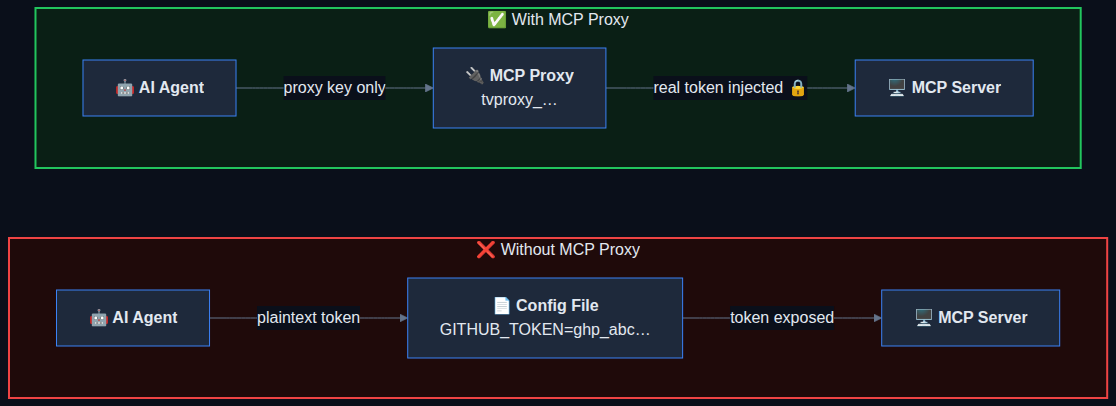
Without MCP Proxy
- Real API keys in plaintext config files
- Every machine has a copy of your secrets
- No way to revoke without changing the token everywhere
- Expired tokens break the agent silently
With MCP Proxy
- Agent only gets a proxy key (random, revocable)
- Real token injected server-side, never exposed
- Revoke the proxy key in one click from the dashboard
- Expired tokens refreshed automatically before forwarding
Proxy Templates
One-click templates for popular MCP servers. Or import any MCP config JSON.
GitHub
Proxy GitHub API and MCP server requests with your stored GitHub token.
Slack
Connect AI agents to Slack workspaces through a secure proxy.
Linear
Proxy Linear project management API calls with injected auth.
Notion
Connect to Notion workspaces without exposing your integration token.
Jira
Proxy Atlassian Jira requests with your stored API token.
Custom / Import JSON
Paste any MCP config JSON and Token Vault extracts the URL and headers.
Have a custom MCP config? Use the Import JSON tab in the create dialog. Paste any { "mcpServers": { ... } } snippet and Token Vault extracts the URL and headers automatically.
Example: Cursor + GitHub MCP
Proxy your Cursor IDE's GitHub MCP connection through Token Vault in 2 minutes.
Create the proxy
In the MCP Proxy tab, select the GitHub template. Choose your stored GitHub token. Token Vault generates a proxy URL and a unique key.
Paste into Cursor
Copy the generated JSON config and paste it into Cursor's MCP settings.
{
  "mcpServers": {
    "github": {
      "url": "https://api.tokenvault.uk/api/proxy/mcp",
      "headers": { "Authorization": "Bearer mcp_k8xm2..." }
    }
  }
}
Notice the header carries the proxy key, not your GitHub token. Cursor never sees your GitHub token — Token Vault forwards the request to your webhook, which injects it server-side. Not even Token Vault sees the token. If it expires, it's refreshed automatically before Cursor even notices.